Deposit and Withdrawal System
The Deposit and Withdrawal System manages customer deposit accounts and facilitates all fund movements within the platform. Deposit accounts are opened from deposit account products, which define the account currency, the single customer type that may use the product, accounting configuration used when accounts are created, and current commercial terms such as the maximum withdrawal amount per transaction. The system is fully integrated with the Cala double-entry ledger, ensuring that every fund movement is properly recorded and that accounts cannot go into overdraft.
Transfers between the bank's own payment endpoints use one internal payment rail across supported currencies. The transfer currency must match the receiving endpoint's currency. Internal rail liquidity is reported separately for each currency, including pending and settled inbound and outbound amounts. External rails remain specific to a currency and its provider venue.
The admin API exposes this distinction through the non-null Rail.currency
object. Its type is ANY for the internal rail, with currency: null, or
SPECIFIC with a currency containing the currency code and qualifier. The
payment rails table displays “Any currency” for the internal rail.
Deposit Account Structure
Deposit accounts are opened from deposit account products. Each product serves exactly one customer type and is dedicated to one partner when it is created; products created without an explicit partner are assigned to the bank. The partner allocation is immutable, so different partner terms require a separate product. Account detail shows the product name in the Product field; the product also defines its immutable currency, customer type eligibility, accounting configuration, whether it is available for new account creation, and the product's current terms version. When an account is opened from a product, Lana records a product agreement that links the account to the product it was opened from, preserves that product lineage, and copies the product terms that were current at account creation.
Each deposit account in Lana is backed by two ledger accounts in the Cala ledger:
| Ledger Account | Normal Balance | Purpose |
|---|---|---|
| Deposit Account | Credit (liability) | Tracks the customer's available balance. Represents the bank's obligation to the customer. |
| Frozen Deposit Account | Credit (liability) | Holds the customer's balance while the account is frozen. Balances are moved here during a freeze and restored on unfreeze. |
In addition, each deposit account product owns a Deposit Omnibus Account that serves as the counterparty for deposits and withdrawals for accounts opened from that product. The omnibus account represents the bank's actual cash reserves backing those customer deposits.
Product Terms and Agreements
Deposit account products carry versioned terms for future agreements. The first supported commercial term is maxWithdrawalAmountPerTransaction, which can be left unset for unlimited withdrawals or set to a positive amount in the product currency.
Updating product terms increments the product terms version only when the terms actually change. Account creation submits the version the operator reviewed and is rejected if the product terms changed before submission, preventing an account from silently opening under different terms. After a refresh, the operator can review and submit the latest version. Existing deposit account agreements keep the terms copied at account creation, so withdrawal enforcement uses the agreement's copied terms rather than the product's current terms. New accounts opened after a product terms update receive the new versioned terms.
Overdraft Prevention
Every deposit account has a velocity control that prevents the settled balance from going below zero. This is enforced at the ledger level, meaning no transaction can make the balance negative regardless of how it is initiated. This provides a hard guarantee against overdrafts without requiring application-level balance checks.
Balance Model
Deposit account balances are reported as two separate figures:
- Settled balance: Confirmed, available funds. Reflects completed deposits minus completed withdrawals.
- Pending balance: Funds encumbered by in-flight withdrawals that have been initiated but not yet confirmed or cancelled. The pending amount reduces the effective available balance.
When a withdrawal is initiated, the amount is immediately moved from settled to pending (via a ledger transaction). This ensures the funds are reserved and cannot be double-spent. When the withdrawal is confirmed, the pending balance is cleared. If the withdrawal is cancelled or denied, the pending balance is restored to settled.
Account Types
Deposit accounts are categorized by the customer type of their holder. Each customer type maps to a separate ledger account set, enabling aggregate balance reporting by customer category:
| Type | Description |
|---|---|
| Individual | Personal customer accounts |
| GovernmentEntity | Government organization accounts |
| PrivateCompany | Business accounts |
| Bank | Banking institution accounts |
| FinancialInstitution | Other financial institution accounts |
| NonDomiciledCompany | Non-resident company accounts |
Each product selects one customer type from the module's chart-level accounting catalog and owns one pair of active and frozen account sets. Only customers of that type can open accounts from it. To serve another customer type, create a separate product; a product's customer type is immutable. This keeps each product's deposit liabilities under the correct parent nodes for financial reporting.
Account Status and Lifecycle
| Status | Description | Deposits Allowed | Withdrawals Allowed |
|---|---|---|---|
| Active | Normal operations | Yes | Yes |
| Inactive | Operationally inactive account | No | No |
| Frozen | Compliance hold or dispute | No | No |
| Closed | Permanently deactivated | No | No |
Account activity is tracked separately from account status. The system classifies each deposit account as Active, Inactive, or Escheatable for dormancy monitoring by deriving the last activity date from the latest customer-driven ledger transaction on the account, or from the account creation date when no qualifying transactions exist yet. Internal freeze and unfreeze balance transfers are excluded, so changing the operational status of an account does not by itself reset dormancy. By default, accounts become Inactive after 365 days without activity and Escheatable after 3650 days, and these thresholds can be changed from the admin app through the exposed domain configs deposit-activity-inactive-threshold-days and deposit-activity-escheatable-threshold-days. The operational status above continues to control whether deposits and withdrawals are allowed.
Freeze Account
Freezing a deposit account prevents all new deposits and withdrawals while preserving the account balance. This is used for compliance holds, dispute investigations, or regulatory requirements.
When an account is frozen:
- The settled balance is moved from the main deposit ledger account to the frozen companion account via a ledger transaction.
- The main deposit ledger account is locked, preventing any further transactions.
- A
DepositAccountFrozenevent is emitted.
The balance remains visible to operators during the freeze. An Inactive or Closed account cannot be frozen.
Unfreeze Account
Unfreezing restores a frozen account to normal operation:
- The main deposit ledger account is unlocked.
- The frozen balance is moved back from the frozen companion account to the main deposit account.
- A
DepositAccountUnfrozenevent is emitted.
The operation is idempotent: unfreezing an already active account has no effect.
Close Account
Closing permanently deactivates a deposit account. This action cannot be reversed.
- Requires zero balance: Both settled and pending balances must be zero before closing.
- Requires no incoming payments in flight: Closing is refused with
PAYMENTS_RECEIPTS_IN_FLIGHTwhile a receipt addressed to the account is still pending, or has settled but has not yet been credited to the account. Settle or cancel the receipt first. - A
Frozenaccount cannot be closed directly; it must be unfrozen first. - Closing also retires the account's payment endpoint. New receipts and new internal transfers addressed to it are rejected, and an internal transfer that was already queued toward it fails, which cancels the sending withdrawal.
- The corresponding ledger account is locked upon closure, preventing any future transactions.
- A
DepositAccountClosedevent is emitted.
Relationship to Credit Facilities
Deposit accounts serve as the destination for credit facility disbursals. When a disbursal is confirmed, the disbursed amount is credited to the customer's deposit account. This means the deposit account balance reflects both direct deposits and credit facility proceeds.
Similarly, when a customer makes a payment on a credit facility, the funds are debited from their deposit account and applied to the outstanding obligations.
Related Documentation
- Deposit Operations - Deposits and withdrawals
- Ledger - Overview of account sets and transaction templates
Admin Panel Walkthrough: Deposit Account Setup
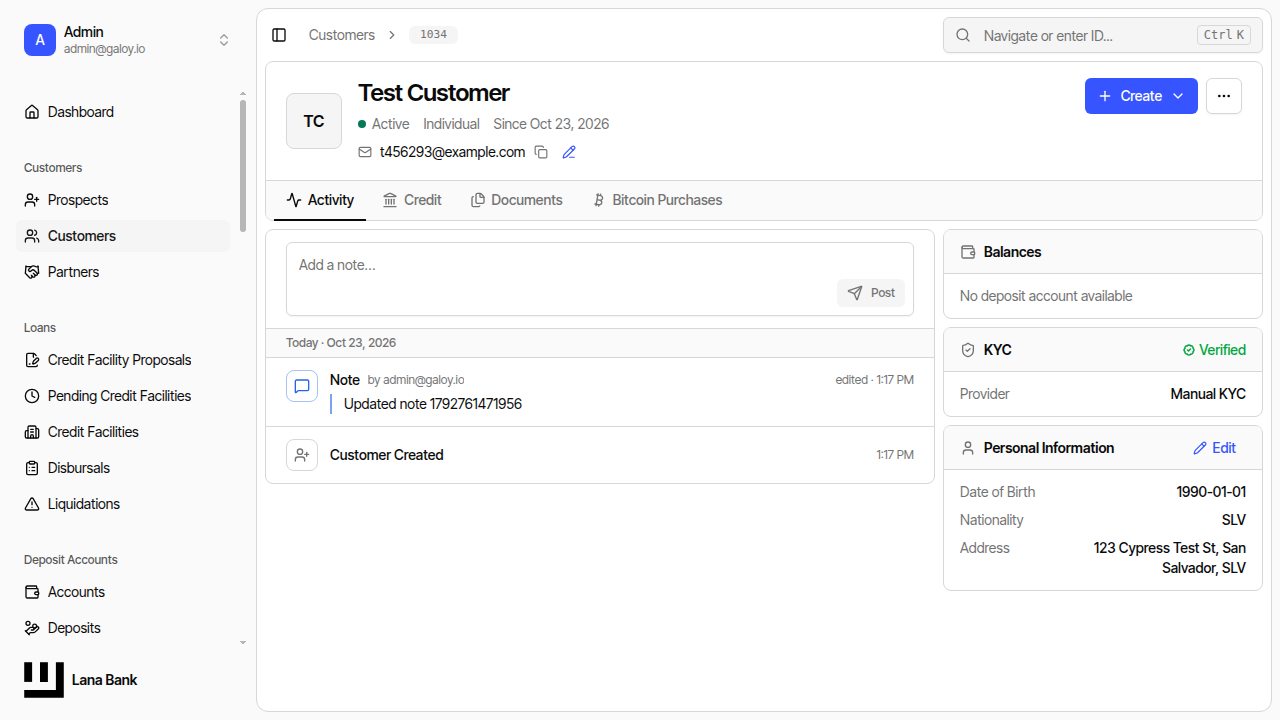
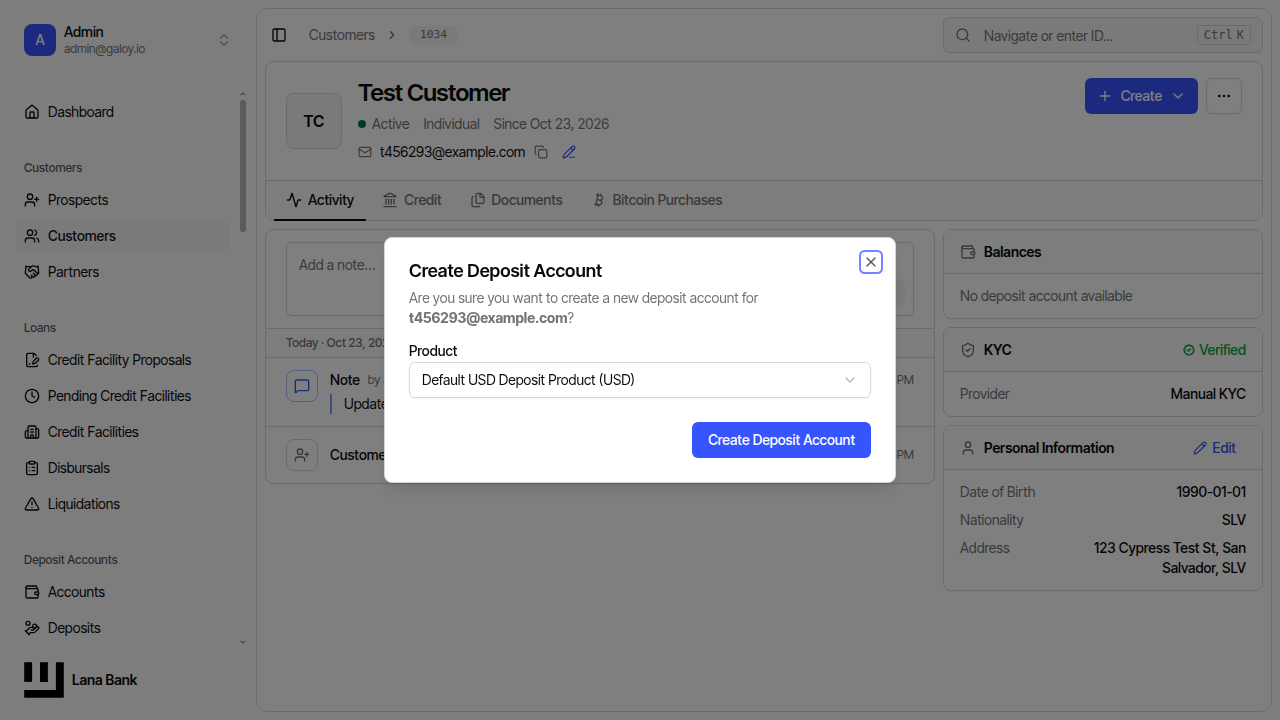
Deposit accounts are required before transaction operations can start. In onboarding flows, the operator may need to create one from the customer profile when none exists yet.
Step 1. Detect missing deposit account from customer detail banner.
Step 2. Open the create deposit account dialog.
Step 3. Confirm deposit account creation succeeds.
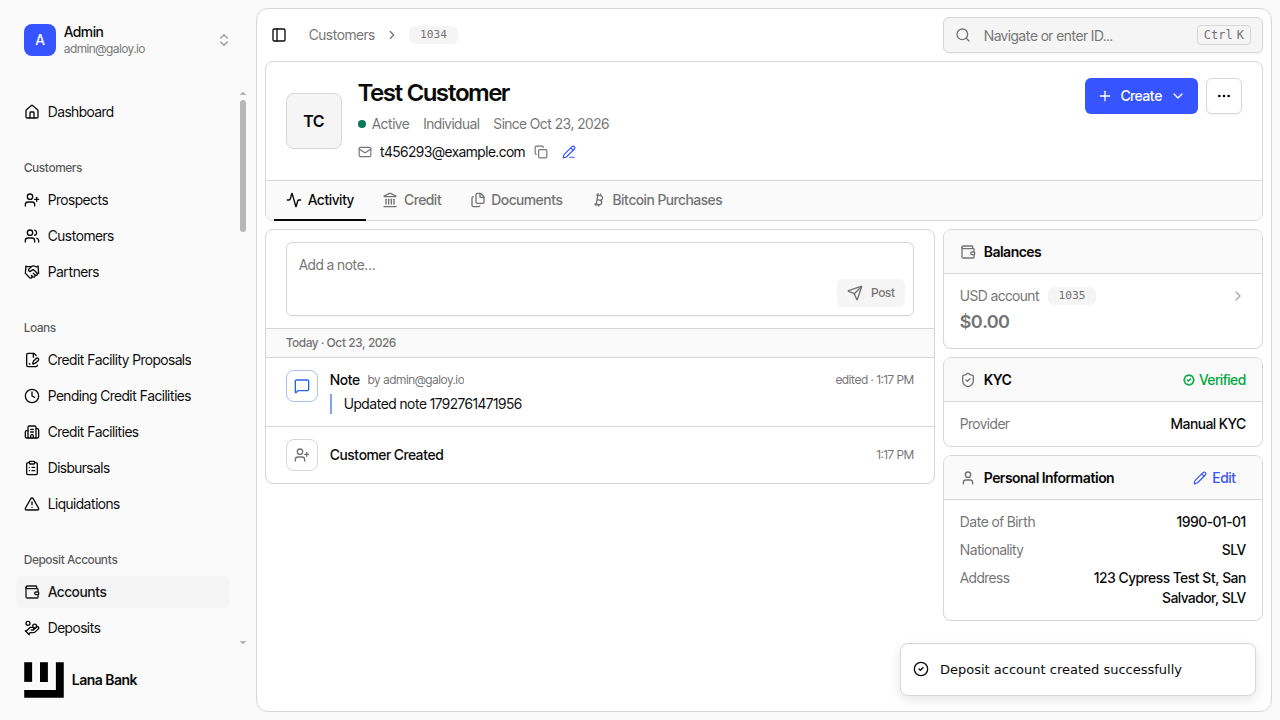
Operational checks after creation:
- account status is
ACTIVE, - customer-to-account association is correct,
- account is available for deposit/withdrawal initiation.